ตาราง (Table)

การใส่ตารางใน html นั้นสามารถที่จะแทรก Tag และกำหนด Attribute ต่างๆ ได้ดังนี้
<table border= “Border” bgcolor= “TableBg” cellspacing= “CS” cellpadding= “CP” width= “Width” height= “Height” background= “Background”>
	<tr bgcolor= “TrBg”>
		<th bgcolor= “ThBg”>Head Text</th>
		<th>Head Text</th>
	</tr>
	<tr>
		<td bgcolor= “TdBg” align= “Align” valign= “Valign” width= “Width” height= “Height”>Body Text</td>
		<td>Body Text</td>
	</tr>
</table>
| Border | คือ | ความหนาของเส้นขอบตาราง |
| TableBg | คือ | สีพื้นหลังของตาราง |
| Background | คือ | รูปภาพพื้นหลังของตาราง |
| CS | คือ | ช่องว่างระหว่างเซลล์ของตาราง |
| CP | คือ | ระยะห่างจากเส้นขอบของตาราง |
| TrBg | คือ | สีพื้นหลังของแถว |
| ThBg | คือ | สีพื้นหลังของเซลล์ Header ของตาราง |
| TdBg | คือ | สีพื้นหลังของเซลล์ ของตาราง |
| Head Text | คือ | ข้อความหัวเรื่องของตาราง |
| Body Text | คือ | ข้อความในตาราง |
| Align | คือ | การจัดตำแหน่งแนวนอน left/center/right/char/justify |
| Valign | คือ | การจัดตำแหน่งแนวตั้ง baseline/bottom/middle/top |
| Width | คือ | ความกว้าง |
| Height | คือ | ความสูง |
| <tr> | คือ | แถวของตาราง 1 แถว |
| <th>และ<td> | คือ | คือข้อมูลในแนวคอลัมน์ |
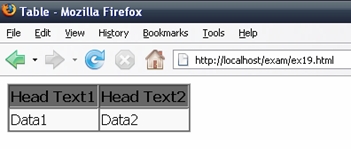
ตัวอย่าง ex19.html
<html>
<head>
<title>Bulleted List</title>
</head>
<body>
		<table border= “1" bgcolor= “#666666" cellspacing= “1" cellpadding= “2">
			<tr bgcolor= “#666666">
				<th>Head Text1</th>
				<th>Head Text2</th>
			</tr>
			<tr bgcolor= “#F9F9F9">
				<td>Data1</td>
				<td>Data2</td>
			</tr>
	</table>
</body>
</html>
ผลลัพธ์
ติดปัญหาตอนทำตาม?
ถามในชุมชน
ความคิดเห็น (0)
ยังไม่มีความคิดเห็น — เริ่มคุยเป็นคนแรก ถามสิ่งที่สงสัย หรือแชร์ประสบการณ์ของคุณ
เข้าสู่ระบบเพื่อร่วมแสดงความคิดเห็น
เข้าสู่ระบบ